Adventuring Underground–Issue 2
Adventuring Underground
Issue 2
By Rob Merritt
Adventuring Underground is a weekly feature that will cover the burgeoning community of shareware and freeware adventure games available on the Internet.
Correction from last week: The construction kit I mentioned called SCAMM is actually called SCRAMM. I apologize for the mistake, and it has been corrected in Issue 1.
The Creator’s Toolbox
Making Your Own Adventure Game 101: Class 2–Tools of the Trade
So you’ve decided to make an adventure game. Hobbyist game making is in so many ways like home gardening. A home garden requires lots of work, love, nurturing and patience in order for it to grow into something wonderful. In order to work in your garden, you are going to need the right tools.
Before I continue, let’s look at your homework. Bet you didn’t think I would check? No matter, you can do the homework at any time. You were suppose to think of your five favorite adventure games, point out their similarities, think of what makes them your favorites, and decide whether they contain the features you would choose to include in your game. Take all that information and decide what type of adventure game it would be. Would it be an action/adventure, an RPG/adventure, a point-and-click adventure, a Myst-like adventure, or maybe something totally original? With that idea in you head, pay attention as I write about tools that you could use to create your game and make mental notes as to which would be the most helpful.
I’m willing to bet that you already have two of the most important tools: yourself and a computer. I realize a great many of you just said, “duh, Rob.” However, I think it’s valuable at the beginning to list all of your assets. Also, in the age of Web TV, you can never be 100-percent sure that your readers are all on computers. Just about any computer you can access the web with is powerful enough for a hobbyist to create an adventure game. Currently, the three most popular platforms that gamers use are Wintel, Macintosh, and Linux. Don’t undersell yourself as an asset. Just about everything you accomplish in your life will because you got motivated and did it. Sure, you can form a team to help, but this will be your game and you will make it happen.
Besides yourself and a computer, the most basic tool you will need is a game creator. Game creators are the heart and soul of what drives the program. These come in three flavors: programming languages, multimedia compilers, and specific game construction kits.
Programming languages are what most people have used to create their games. Some require more work than others. Programming languages like C++ take a vast amount of time to learn and to create anything useful. They are powerful, and if your game requires no compromises in speed or ability, you’ll want to use a language like C++. Then there are languages like Visual Basic and Delphi that have a shorter learning curve and development time but normally sacrifice speed and some flexibility. No matter what you choose from this group, you’ll spend many weeks, months, or even years before you even start making your vision into a game. The biggest plus is that no matter what platform you work on, there is a programming language available to create games with.
Multimedia compilers are general purpose program builders. You could use them to create a slide show or any 2D games. Programs like Macromedia’s Director and IMSI’s Multimedia Fusion belong to this category. These allow you to create a program with virtually no code. You place objects on your work space and check off what events you want to happen and when. They sacrifice some speed and a lot of flexibility for ease of use and an extremely short development time. Multimedia compilers can be confusing. Since they have to create a large range of programs, there is often not a clear way of getting what you want done. In case you don’t know, Multimedia Fusion is the fourth and most advanced product in the Klik & Play family. These are available for mostly Windows and Mac platforms.
Game-specific construction kits are the best route to go for the hobbyist if he or she knows exactly what type of game he/she wants to create and there is a construction kit available for it. They have the most desired functions right at your fingertips. Speed is hardly an issue since they have been optimized for one type of game. However, very often they are not flexible at all. One of the big problems is that there isn’t really any current construction kits. Projects like SCRAMM and BOT seem to be far from completion, and the older ones like AGI run under DOS and are technically inferior to most gamers’ expectations. A subcategory is text adventure creation kits like AGT and GAS. This older type of adventure game has a loyal following and might be just the perfect creative outlet for those whose have a difficult time drawing graphics but are good with the written word.
The last major must-have tool is a word processor. Any text editor with a spell checker will do. You will need this to write the story outline, type out dialog, and on some game creation systems, edit scripts. I guess that a word processor is optional if you have superhuman spelling abilities and you are quite happy to use edlin or vi.
At this point, you could dive right in and start making an adventure game. I wouldn’t recommend it since, unless you are making a text adventure game, you are going to have to rely on whatever graphics the game creation software came with, if any. If you are intent on creating graphic adventure games, you are going to need some additional tools to create the graphics.
Graphic programs can range from free to unbelievably expensive. The basic Paintbrush program that comes with most platforms is a nifty tool to get started with. Since something like it comes on most platforms, it is virtually free, and free is good for the hobbyist game creator. Nothing too advanced but enough to get you started. Unless you are truly gifted, don’t expect to create Myst-quality graphics with a Paintbrush program. Eventually you will probably have to invest in a more advanced paint program. When you do go shopping for a more advanced graphics program, there are a few features you will want to keep an eye out for. Not only will you want the ability to draw but also to crop, rotate, scale, layer, filter, and convert images as well. Paint Shop Pro, Corel Draw, Photoshop, and Neopaint are some of the more popular paint programs in use on the Wintel platform.
If you really want to get fancy, you might want to look at using a 3D-rendering program. You can use this class of programs to generate computer graphics similar to those you see in Myst. They aren’t all that easy to use if 3D modeling isn’t something you are skilled at. However, if you do have the knack, you will be able to create some awesome graphics. POV is a popular freeware 3D-rendering program that has been ported to many platforms.
The last tool you’ll need is a sound creation program. Actually, you will probably need two programs: one program to create and edit wave sound format files and another to create midi music files. For wave sounds, you could use whatever sound recorder that came with your platform. If you want to edit and jazz up your wave sounds, you could use a program like Cool Edit that can add echo, reverb, and many other filters. As for midi, unless your sound card came with a free package, you will have to go out and buy a midi maker.
With these tools in hand, you are ready to create an adventure game. Now, there are many other tools out there that you may end up using. Scanners, digital cameras, and even your local library could end up being very useful tools. I will touch on those in week six and beyond. Here are two links with even more tools listed: http://members.tripod.com/~virtual_cat/games/ and http://www.mindspring.com/~ambrosine/resource.html.
Your homework for this week: play with Paintbrush to draw up rough sketches of in-game graphics for an adventure you would like to create or use your word processor to type up some possible lines of dialog–just a few graphics or lines of dialog to get your creative juices flowing.
Links for some of the software discussed above:
Corel Draw
Photoshop
Multimedia Fusion
Macromedia Director
Cool Edit
AGI
SCRAMM
BOT
POV
Featured Underground Game of the Week: Agapito’s Crazy Adventure
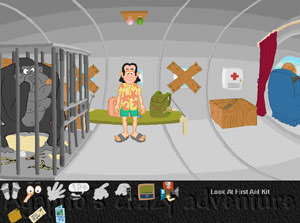 Here is a shareware game done by a small team that matches some of the efforts done by the big boys with big teams. The first thing that anyone who views this game will notice is its excellent cartoon-quality graphics and clean interface. It is solid and constant. Aworld’s Agapito’s Crazy Adventure also has plenty of good humor that is missing in many hobbyist efforts.
You play Agapito. Agapito has just won a contest for a free trip to the islands. Unfortunately, the trip isn’t quite what he bargained for. The game feels sort of like a Leisure Suit Larry without the sleaze factor.
Click on the link above to check out Agapito’s crazy adventure yourself.
If you have a game, or know of a game, that should be a featured underground game of the week, drop me a line.