Just Adventure original
Infinite Ocean Walkthrough
The unaltered guide: no contents list, no checkboxes, no page breaks. This is what the archive holds. Back to the reading view
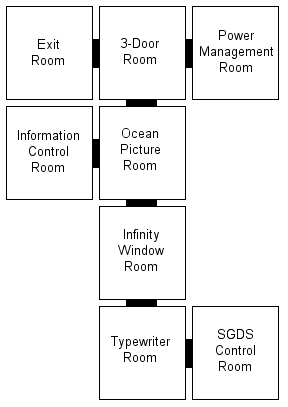
TYPEWRITER ROOM (START)
You begin in a room facing a typewriter. You can NOT go through the door in front
of you without an ID card. Turn Left and grab the circuit board. Face the typewriter
again and turn right. Grab the ID Card off of the box. Again, face the typewriter
and you may now proceed through the door.
INFINITY WINDOW ROOM
Grab the screwdriver. Turn right, and click on the right SGDS Terminal.
Click on [PW_LIST]
– SGDS Control (LCL): 0470400
– SGDS Power Management: 845878 <gibberish>
Exit this terminal.
The terminal on the left unlocks the Information Control Room. We
do NOT have that password yet, but let’s click on the mail/Jerry
note. Jerry’s password is: ABCDEF.
Lets go back to the typewriter room via the door with the clock
next to it (11:58 – 2 minutes to midnight…)
TYPEWRITER ROOM
Turn left and enter the SGDS CONTROL Computer room.
SGDS CONTROL ROOM
Read the 4 notes on the floor. Make a note of: 52891013567. Turn right and
click the panel under the SGDS terminal. Says it is secured by 4 screws.
Click your screwdriver to open the panel. Click your circuit
board to repair
it.
You can now access the
SGDS Control terminal. It needs a password and we have it: 0470400 click <accept>. Click [REPAIR]. Click
[STATUS] "[SECURITY MODE: EMERGENCY][CONTROL MODE:MANUAL][AUTOREPAIR:OFF]".
Lets go back to the Infinity Window room. Exit this room.
TYPEWRITER ROOM
Turn right. Go through the door.
INFINITY WINDOW ROOM
The door ahead of us has been repaired. Lets go through it.
OCEAN PICTURE ROOM
We should now be in a
room with a table and a picture on it. Turn left. Look at the note
on the floor, "password: 256719…or was the nine
a two?".
Turn left. Note on the bulletin board – password: ORIENO.
Turn left. Click on the
panel beneath the SGDS terminal. Held by 4 screws again. Click
your screwdriver to open the panel. Click on
the panel again to take the cable. Access the SGDS terminal. Note
the Emergency Password: <gibberish> 567832518 <gibberish>.
Face the door with the picture on the table next to it. Exit through
this door.
3 DOOR ROOM
You’ll be facing an SGDS
terminal with a panel under it. Click the panel. "One
of the cables seems to be damaged." Click your cable you have to repair
it. Access the terminal and click PMR. This password will get you into the
room with the Power Management terminal. Type in the password from the bulletin
board: ORIENO <accept>.
We’ve now unlocked the door to our right, but lets go left. We should
be facing the door with the light next to it. Go through the door.
EXIT ROOM
Here you’ll find Jerry’s
portable computer. Click "/files". Type
in Jerry’s password: ABCDEF <accept>. Click "/files" again.
ICR PASSWORD: 37089. EMERGENCY MODE: 9367528 <gibberish>. Exit this
room.
3 DOOR ROOM
Turn right. Face the
door with the SGDS terminals to either side of it. Access the SGDS
terminal on the left. Click [SGDS_56]. Power Management: <gibberish> 587832.
Exit the terminal and go through the door.
OCEAN PICTURE ROOM
Go through the door in front of you to the Infinity Window room.
INFINITY WINDOW ROOM
Turn left. Face the two
terminals. Access the one on the left. Click [INFO_U]. Type in
the password from Jerry’s computer: 37089 <accept>. This
unlocks the door to the Information Control Room.
Exit the terminal, turn left, and go through the door.
OCEAN PICTURE ROOM
Turn left, and enter the Information Control Room.
INFORMATION CONTROL ROOM (Computer-filled Room)
Turn left. Access left-most
SGDS terminal. Click [PASSW.] EMERGENCY: <gibberish> 251801.
Leave this terminal and
access the one to the right of it. Click [IO_MODE]. Enter the Information
Override password: 256712 <accept> (turns
out the nine WAS a two!). Leave this terminal.
Turn right and access
the SGDS terminal. "Before EMERGENCY
MODE can be turned off, POWER MANAGEMENT must be set to AUTOMATIC
and INFORMATION OVERRIDE must be DEACTIVATED." (Well, we just
deactivated the Information Override, so its on to Power Management).
Leave this terminal and
turn around to face the door. Access the SGDS terminal next to
the door. Click [EJECT]. You now
have a disk. Leave this terminal and exit the room.
OCEAN PICTURE ROOM
Turn left and go through
the door.
3 DOOR ROOM
Turn right and go through
the door
POWER MANAGEMENT TERMINAL ROOM (SGDS Terminal with disk slot)
Turn right and click
on the slot on the terminal. Click on your disk. Access the terminal.
Remember the 845878 <gibberish> and the <gibberish> 587832?.
Looks like we have a partial begining and a partial end of this
password. Put them together and together and you get: 84587832.
Enter it in and click <accept>.
Let’s go back to the computer room. Exit this room.
3 DOOR ROOM
Turn left and go through
the door
OCEAN PICTURE ROOM
Turn right and go through
the door.
INFORMATION CONTROL ROOM (Computer-filled Room)
Access the SGDS terminal
in front of you. It wants a 23-digit password! (I don’t remember
seeing one that long. Wait! Maybe it’s the same as the last
one we did).
Lets look at what we have:
9367528 <gibberish>
52891013567 (from one of the 4 notes we found on the floor)
<gibberish> 567832518 <gibberish>
<gibberish> 251801
Let’s fit these all together:
93675289101356783251801 (Hmmmm, 23-digits…). Lets type this in
then and click <accept>.
(WARNING: If you type
this in wrong, step away from the terminal then go back into
it! There is a bug, at least in the version I have,
that doesn’t reset the puzzle when you type it in wrong).
If you did this correctly, you should hear a door open in the distance.
Leave this room.
OCEAN PICTURE ROOM
Turn left and go through
the door.
3 DOOR ROOM
Turn left and go through
the door.
EXIT ROOM
The light outside is
shining in… Lets get out of this place!!
Screenshots
